Homework 5: Mr. Smiley Goes for a Scroll
Short Description:
Write a program that allows the user to move Mr. Smiley between home and school.Goals
When you finish this homework, you should have written a program- that employs transformation matrices.
- that employs animation.
Formal Description
Mr. Smiley wants to walk between home and school. The path from home to school is along a long straight line, but filled with animated things. For your next assignment you are to recreate this world and allow a player to explore the place that puts a smile on Mr. Smiley's face.
Mr. Smiley, and all of the people in his world, should be implemented as a stick figure. They must have a face. The color of the face should be set-able, but yellow by default. He should have two eyes, a smile, but you may make these changeable if your wish. He is completed with a body, two arms and two legs. You have the right to change the appearance of people as long as they meet the above specifications.
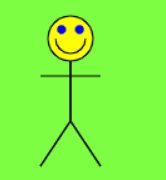
You will probably want the ability to set a rotation, translation, and scale matrix for your people. My interface consisted of the following:
class Person {
    constructor(cx=0, cy=0)  // create at (cx, cy)
    SetPos(x,y)              // set position
    SetScale(scale)          // set scale
    SetRotate(theta)         // set rotation
    SetFaceColor(color)      // set face color
    Next()                   // stub, does nothing
    Display(ctx)             // requires the context
}
The world is sometimes animated as well. You should start with animation turned off and toggle animation with a keypress of 'g'.
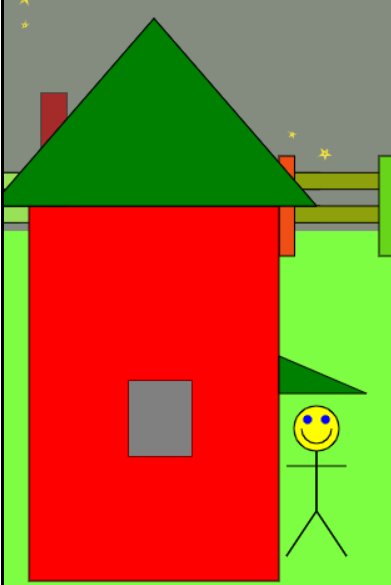
Mr. Smiley's home completely blocks the left hand side of the screen. It should roughly resemble the house in the screen shot. This house includes a roof, awning, chimney and window. Mr. Smiley may not walk into or through this house. Apparently someone has locked all the doors, even the one to the basement! This is my version of Mr. Smiley's house. Yours may be changed to fit your taste.
At the other end of the world is Mr. Smiley's School. It should block the right hand side of the world. Again Mr. Smiley may not enter or walk through the school. Feel free to use your creativity to create this school in a way that is pleasing to you.
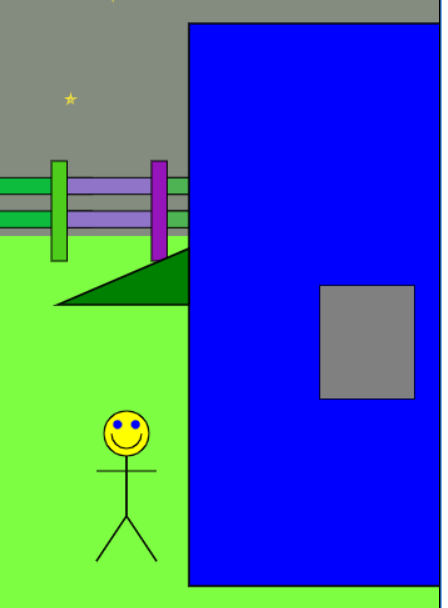
Mr. Smiley's world is divided between the earth, which is a nice shade of green and the sky. As it is late evening, the sky is dark gray and there are a multitude of stars twinkling.
A magnitude consists of at least 100 stars. They "tinkle" by changing scale and rotating. The stars should not all be at the same place in scaling or rotation. The stars should be completely contained in the sky. You may feel free to use my star class, however you will probably want to modify the class to meet the specifications for this program.
There is a fence at the back of Mr. Smiley's world. Probably to keep him from wondering off into a dangerous location. I built a fence section class that draws a fence post and the two boards to the right of that post. I then created multiple instances of that class to build the entire fence.
There are at least three different items which are present Mr. Smiley's world. Two people on a teeter totter, a person on a swing, and a couple walking hand in hand. The specifications for these are given below. You must include at least two instances of each item in your final product. You may implement additional items.
The teeter totter contains two people. These people rock back and forth when animation is turned on. Additionally they do their best to stay upright, in spite of the motion of the teeter totter.
The swing is a simple frame with a rope suspended from the top. It has a seat at the end of the rope and a person sitting on that seat. The person will lean "out" at the peak at each end of the swing.
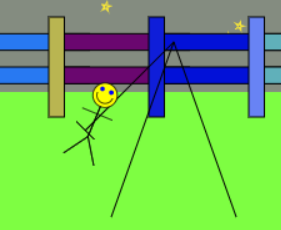
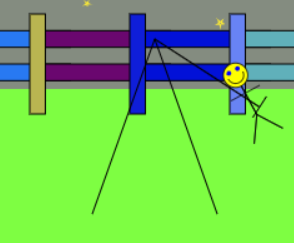
Finally, there is a couple walking about the park. In my world they are walking in a square. While it is not required that they walk in a square, you should have them walk in a pattern other than a line or a circle. Note, the couple is "behind" Mr. Smiley but in front of the fence.
Scoring
- Required for grading: A world, with the House, School, Mr. Smiley, sky and earth. Mr. Smiley can walk between the two locations.
- 1/4 of the points: A fence and stars that twinkle when animated.
- 1/4 of the points: Animated teeter totter, no points if not animated.
- 1/4 of the points: Animated swing, no points if not animated.
- 1/4 of the points: Animated strolling couple, no points if not animated.
I would consider extra points for some form of game play. For example, you could have magic mushrooms pop up from time to time and give Mr. Smiley points if he collects them within a given time limit. Alternatively you could add falling frownie faces that shrink Mr. Smiley each time they hit him until he is shrunk to nothing.
Documentation
I don't require a design document, but I feel it would be foolish of you to attempt to write this program without one.Create a introduction page. This should include
- comments on any errors or special features in your program.
- any improvements that you feel are worth extra credit.
- instructions on how to run your program near the canvas.
- a list of collaborators.
Additional Requirements/Comments
- The program should produce no warnings or errors.
- All drawable items should be implemented as a class. At minimum they should have the following interface
- A constructor
- Next() a function to perform any animation required.
- Display() a function that takes the context and displays the item.
- Reset() a function to return the item to time 0.
- Most of my classes had an interface similar to the Person class listed above.
- I didn't implement all functions for all objects.
- Stacking order
- The sky is furthest back.
- The stars are next
- The fence is in front of the stars
- The scene items, teeter totter, swing and couples, are next
- The house, school and Mr. Smiley are in front.
- Mr Smiley may not touch the school or home.
- I created three sets of objects
- Static object such as the land and sky.
- These were not affected by Mr. Smiley's position in the world
- Dynamic objects, most other objects.
- These were affected by changes in Mr. Smiley's position.
- Mr. Smiley
- He was just drawn in the center of the screen, at least the x center of the screen.
- My main display function looked something like this
-
function Display(object) {
   if (animation) {
       object.Next();
   }
   object.Display(ctx);
}

function DrawScene(){

     ctx.clearRect(0,0, canvas.height, canvas.width);
     ctx.save();

     statics.forEach(Display);

     SetWorld();

     dynamics.forEach(Display);

     ctx.restore();

     Display(Smile);
}
- Static object such as the land and sky.
Extras
I find that I want to continue to play with simulations/visualizations of this type. Please do so, but only if you have sufficient time, do not enhance this, or any other project at the expense of your other classes.Submission
When you have finished your assignment, please submit a tar/zip file containing all files needed for this project.Please submit your tar file to the D2L assignment folder Homework 5 by the due date.